
Contents

Introduction
Tamarac CRM integrates with Advisor View and Advisor Rebalancing. Your firm’s Data Manager can enable the bi-directional integration and events between the products.

Features of the Available Integrations
Your firm can choose to enable the following integration points with the listed features:
Household Integration
-
Bi-directional integration of Household name and address fields.
-
Rollup view of Household values from Advisor View in Tamarac CRM.
-
Household creation from Tamarac CRM in Advisor View.
-
Financial accounts assignments to their households from Advisor View in Tamarac CRM.
-
Contextual single sign-on from Tamarac CRM to Advisor View.
Contact Integration
-
Bi-directional integration of Contact name and email address fields.
-
Client creation from Tamarac CRM in Advisor View.
-
Client portal launching from Tamarac CRM in Advisor View
-
Contextual single sign-on from Tamarac CRM to Advisor View.
Financial Account Integration
-
Detailed view of financial account information from Advisor View in Tamarac CRM.
-
Contextual single sign-on from Tamarac CRM to Advisor View.
Integration Events
-
Integration of actions taken in Advisor Rebalancing, like approving a rebalance or logging orders.
-
Integration of actions taken in Advisor View, like clients logging into their client portal or posting documents.
Enable Integration Settings
To enable integration in Tamarac CRM, follow these steps:
-
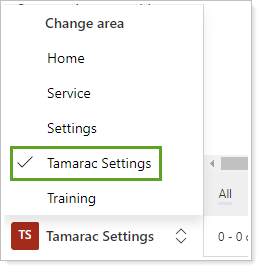
In the Change Area at the bottom left, choose Tamarac Settings.
-
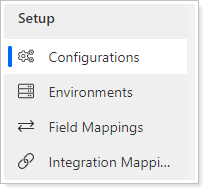
Under Setup, choose Configurations.
-
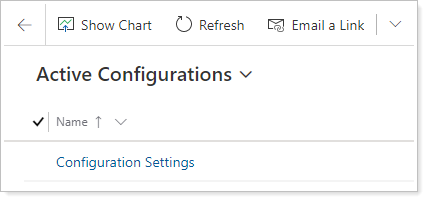
Click Configuration Settings.
-
In Integration Settings, select the integrations you would like to enable.
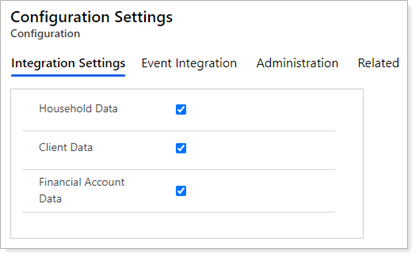
See Household Integration, Client Integration, Financial Accounts, and Reporting Groups for detailed information on which data points are included in the integration.
-
When finished, click Save.
Enable Event Integration
Note
You can choose to integrate an event as either a completed task associated to the client’s Household, a completed external event log, or both. See Event Integration for detailed information on which events and data points are included in the integration.
To enable event integration in Tamarac CRM, follow these steps:
-
In the Change Area at the bottom left, choose Tamarac Settings.
-
Under Setup, choose Configurations.
-
Click Configuration Settings.
-
In the Event Integration section, select any event you would like to enable.